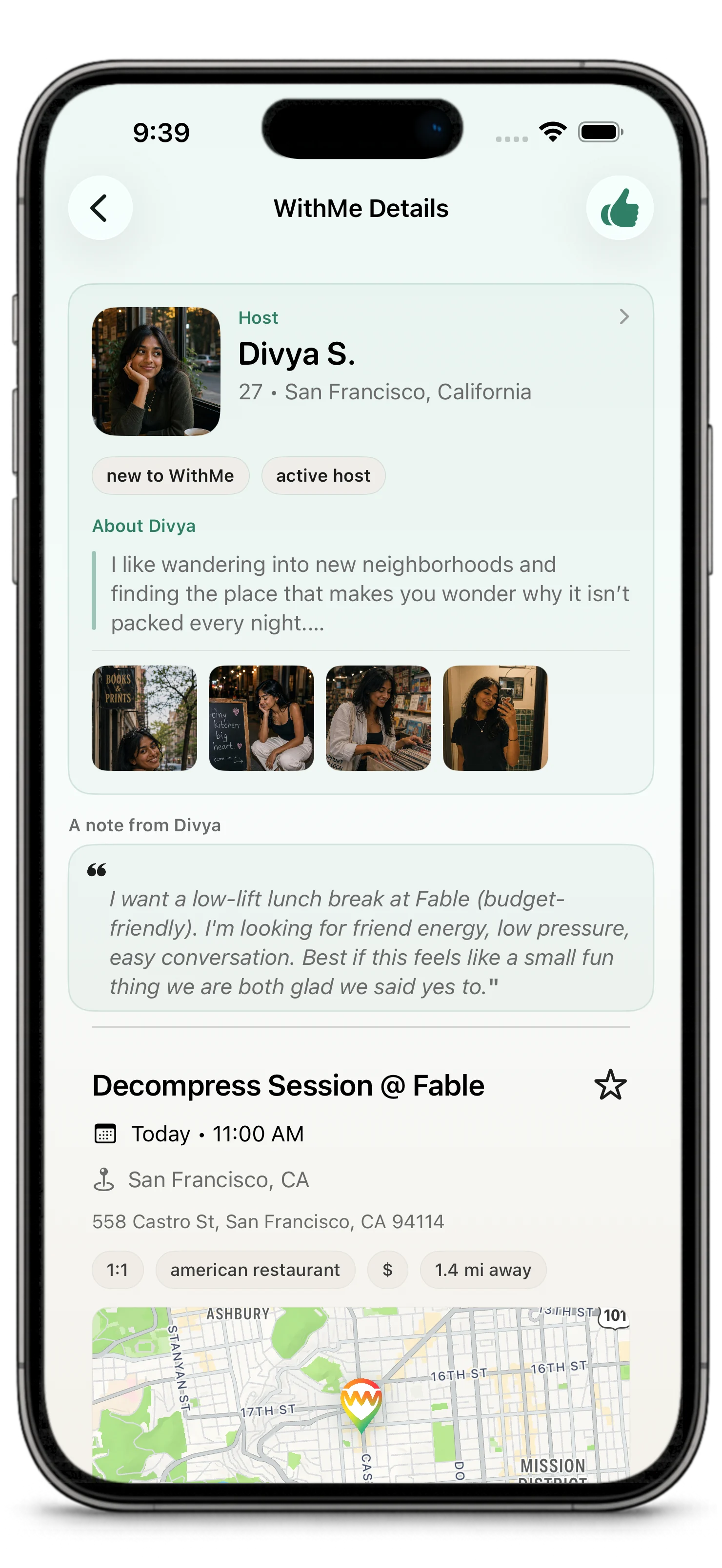
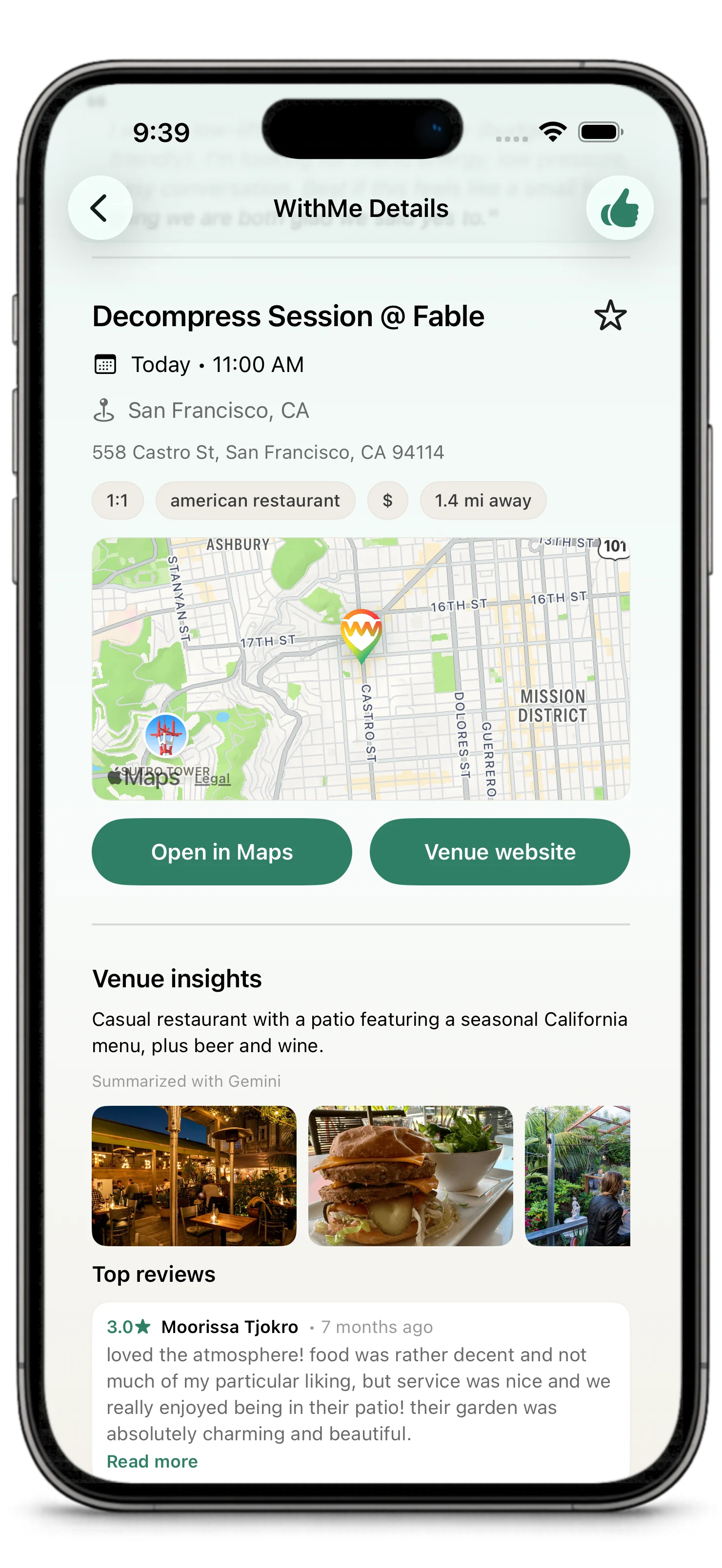
WithMe is for the moment when "we should do something" needs to become real.
WithMe starts with a plan people can understand: a place, a time, a host, and a reason to go. Make it public when you want discovery. Make it private when you already know who you want to invite. Either way, the point is the same: give people enough context to say yes to an actual plan.
The goal is simple:
Turn social intent into a plan that can actually happen.
The Basic Idea
A WithMe is the plan itself.
It usually includes:
- where you want to go
- when you want to go
- who is hosting
- whether it is one-on-one or a group
- whether it is public or private
- what kind of connection the host is open to, such as friends, dating, or social plans
- a note from the host explaining the vibe
WithMes are intentionally near-term. They are created for times at least 3 hours away and no more than 7 days out, so the plan feels live rather than theoretical.
People can discover a WithMe or open a private invite, read the details, look at the host profile, and express interest. The host then chooses who joins. Once the host chooses, the WithMe is confirmed.
Why WithMe Exists
Most social plans stall because the important details stay fuzzy for too long: where, when, who is going, and what the plan is actually for.
WithMe is built around momentum: enough structure to make a decision, without turning a social plan into admin work.
It helps people:
- start with a real venue instead of a vague idea
- make plans that have enough detail to feel believable
- open a plan to discovery or keep it private with a secure app link
- express interest without a long back-and-forth first
- let the host choose who joins
- keep the plan organized with chat, updates, notifications, and reminders
WithMe is not trying to replace friendship, dating, group chats, or calendars. It is the missing layer between wanting to go out and actually getting there.
It is also a community loop. Each completed WithMe can make the next one better: people go somewhere real, share venue feedback afterward, and help future hosts and guests choose places with more confidence.
How a WithMe Works
- A host creates a WithMe.
The host picks a venue, time, group size, privacy setting, and social intent. They can add a note so people understand what kind of plan it is.
- People discover it or receive a secure app link.
A public WithMe can appear in discovery surfaces or show up through recommendations. A private WithMe can be shared through a secure app link that opens the plan in WithMe for the invited person.
- A guest expresses interest.
If someone can see the WithMe, they can usually express interest in it. Preference fit can affect recommendations, but visible plans are not blocked just because the person is in another city or does not match every preference perfectly.
- The host chooses who joins.
The host reviews interested people and selects the guest or guests they want to include. Host choice generally closes 1 hour before the plan starts.
If a guest is still waiting, they may be able to send one nudge to remind the host to make a decision.
- The WithMe becomes confirmed.
Host selection confirms the plan. Guests do not need to accept again after being selected.
- Everyone keeps moving toward the plan.
Chat opens after confirmation. Notifications, status updates, check-ins, and reminders help the group stay coordinated. After the WithMe is done or no longer active, chat closes for new messages.
- Participants can review the venue.
After a completed WithMe, participants may be encouraged to rate or review the venue. That feedback helps other people understand which places work well for real plans, and it helps WithMe improve venue ratings, community signals, and future suggestions.
This is one way WithMe becomes more than a planning tool. A completed plan can contribute back to the community by helping the next person choose a better place.
Ways to Use WithMe
You can use WithMe for different kinds of real-world plans:
- invite a friend to try a restaurant
- make a one-on-one coffee plan
- host a small group dinner
- find people nearby who want to do something similar
- plan around a favorite venue
- create a private plan and share it with a secure app link
- ask for help when you know you want to go out but do not know where to start
The format is flexible, but the center stays the same: a real plan at a real place.
Main App Areas
The exact layout may vary slightly between iOS and Android, but the core areas are the same.
Discover
Discover is where you browse open WithMes and nearby plans. You can review the venue, time, host, group size, notes, photos, and other details before deciding whether to express interest.
Around Me is part of discovery. It helps you explore nearby open plans in a location-centered way.
For You
For You highlights people, plans, and venues that may be a good fit based on your profile, preferences, location, place interests, and WithMe activity. It is meant to make the blank-page problem easier: when you want to go out but do not know where to start, For You gives you better starting points.
For You can include People you might want to go with, Places you might like, and favorite venues you saved for later.
Create
Create is where you propose a new WithMe. You choose the venue, time, privacy, group size, intent, and host note. You can make the WithMe public or private. Private plans can be shared with a secure app link, so invited people can open the plan directly in WithMe without making it broadly discoverable.
WithMes
WithMes is where your active and past plans live. It shows the plans you are hosting, the ones where you expressed interest, confirmed plans, and completed history.
The Next 7 Days agenda is part of WithMes. It gives you a calendar-style view of upcoming plan activity in the near-term window: confirmed plans, open WithMes you are hosting, host decisions that need attention, and WithMes where you have expressed interest.
Completed WithMes may also include a venue-rating action. That is about the place and the experience of hosting or meeting there, not about rating another participant.
That distinction matters: WithMe uses venue reviews to strengthen the shared map of good places for real plans. It does not turn participants into public scores.
Inbox
Inbox gathers conversations, plan updates, and items that may need attention. If a WithMe has new activity, chat, or an important update, Inbox helps bring it back into view.
Profile
Profile is where you manage how you show up to other people. Your photos, bio, preferences, location, notification settings, and trust/safety controls all belong here.
What Iyo Does
Iyo is WithMe's in-app concierge for real plans.
Iyo is not a general-purpose chatbot inside the app. Iyo is a guided product agent: useful because she understands the WithMe, venue, chat, create draft, or review moment you are already in.
Iyo is there to help with the WithMe in front of you: choosing a next step, thinking through a plan, improving a host note, drafting a message, or helping move a plan forward when you are stuck.
You may see Iyo while creating a WithMe or inside a WithMe detail screen when the plan could use a next action.
Public and Private WithMes
A public WithMe can be discovered by people who are eligible to see it. Public plans are useful when the host is open to interest from people nearby or from people who match the plan's audience.
A private WithMe is invite-led. It is not meant to rely on public discovery. Instead, the host shares a secure WithMe app link with the people they want to invite.
That link opens the plan in WithMe and carries the invite context with it. It is useful for sending a plan through text, chat, email, or another app while still keeping the WithMe itself private inside the product.
Both public and private WithMes are still real plans. Privacy changes how people find the plan, not the core flow.
One-on-One and Group Plans
WithMe supports one-on-one and group plans.
For one-on-one plans, the host selects one guest.
For group plans, the host can bring multiple people into the plan, depending on the capacity and plan settings.
In both cases, host selection is the confirmation moment.
Trust, Safety, and Expectations
WithMe is designed to help people make real plans responsibly.
The app includes:
- profiles with context before someone joins a plan
- host choice before a WithMe becomes confirmed
- reporting and blocking tools
- notification preferences
- status updates and plan history
- product rules that avoid surprising hidden blockers
WithMe does not guarantee turnout, compatibility, safety, or chemistry. It helps structure the plan, show relevant context, and keep the experience accountable.
Common Terms
WithMe
The plan itself. A WithMe is the object people create, discover, join, chat around, and complete.
Host
The person who creates the WithMe and chooses who joins.
Guest
Someone who expresses interest and may be selected to join.
Venue
The place connected to the plan, such as a restaurant, cafe, bar, park, event space, or other real-world location.
Venue Review
Feedback participants can leave after a completed WithMe. Venue reviews help the community and can influence future venue suggestions.
Interest
The action a guest takes to say they want to join a WithMe.
Confirmed
The plan state after the host selects the guest or guests.
Private Invite
A secure app link that lets an invited person open a private WithMe.
For You
The recommendation surface for suggested people, plans, venues, and favorite places.
Next 7 Days
The agenda view inside WithMes for upcoming confirmed plans, open WithMes, host decisions, and interests.
Iyo
The WithMe planning helper for next steps, notes, ideas, and plan momentum.
What WithMe Brings Together
WithMe brings together the pieces that usually live in separate places:
- a venue people can understand
- a time close enough to act on
- a host who makes the decision
- a clear way to express interest
- chat and updates after confirmation
- venue feedback that helps the next plan
That is the product idea: move from social intent to a real-world plan with enough structure to keep it moving.
Where to Go Next
- New to the app: Getting Started
- Creating a plan: Create a WithMe
- Choosing visibility: Public and Private Plans
- Sharing a private plan: Sharing Secure App Links
- Understanding recommendations: For You, Suggestions, and Favorites
- Understanding Iyo: Iyo
- Joining a plan: Discover and Express Interest
- Hosting well: Hosting and Choosing Guests